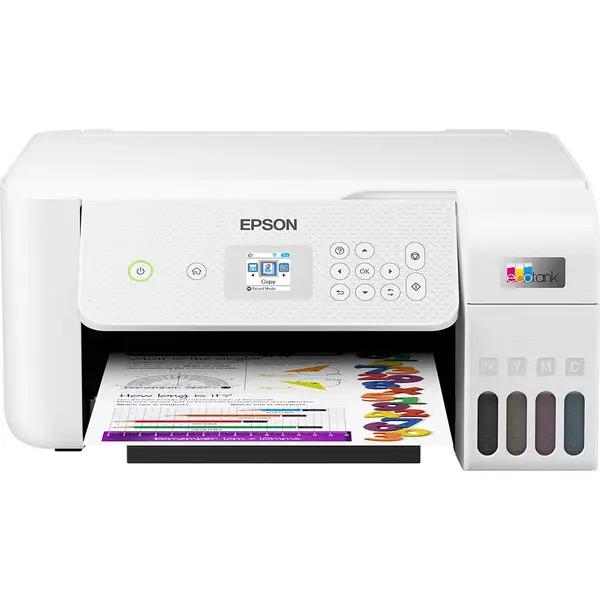
EcoTank ET-2870 Printer
A multifunction colour ink tank printer for printing, scanning and copying, with Wi-Fi, Wi-Fi Direct and mobil…
Not for sale
A full side-by-side comparison of reference models EcoTank ET-2870 Printer and EcoTank ET-4800 Printer within the same category.
A multifunction colour ink tank printer for printing, scanning and copying, with Wi-Fi, Wi-Fi Direct and mobil…
Not for sale
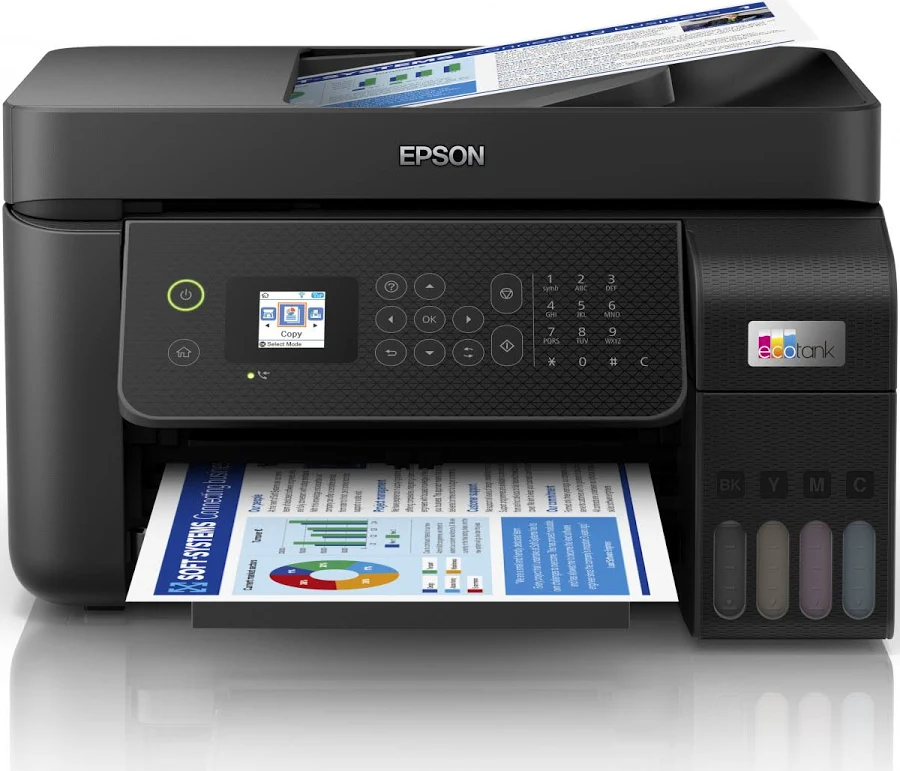
An Epson EcoTank printer identified by the ET-4800 model, intended for users comparing tank printer options an…
Not for sale
| Specification | EcoTank ET-2870 Printer | EcoTank ET-4800 Printer |
|---|---|---|
| Price | Not for sale | Not for sale |
| Features | ||
| Printer Functions | Print, Scan, Copy | Print, Scan, Copy, Fax |
| LCD Display | 1.44-inch / 3.7 cm color LCD | 1.44-inch / 3.7 cm color LCD |
| Control Panel | color control panel with 3.7 cm diagonal LCD | 1.44-inch color LCD with navigation buttons, numeric keypad and dedicated fax controls |
| Printer Specifications | ||
| تقنية الطباعة | Epson PrecisionCore | Epson Micro Piezo |
| Printing | ||
| Print Colors | 4 | 4 |
| Ink System | Black, Cyan, Magenta, Yellow | Black, Cyan, Magenta, Yellow |
| Maximum Print Resolution | 5760 × 1440 dpi | 5760 x 1440 dpi |
| Duplex Printing | Manual | Manual |
| Borderless Printing | Up to 10 x 15 | Up to 10 x 15 |
| Paper size | A4 | Legal |
| Print Margins | — | 3 mm minimum on top, bottom, left and right mm |
| Voice-Activated Printing | — | Yes |
| Ink | ||
| Ink Technology | Dye Ink | Dye Ink |
| Included Black Ink Yield | 3600 pages | 4500 pages |
| Included Color Ink Yield | 6500 pages | 7500 pages |
| Standard Black Ink Bottle | Epson 104 Black, C13T00P140 | Epson 522 Black, 65 mL |
| Standard Colour Ink Bottles | Epson 104 Cyan C13T00P240, Magenta C13T00P340, Yellow C13T00P440 | Epson 522 Cyan, Magenta and Yellow, 65 mL each |
| Replacement Black Ink Bottle Yield | 4500 pages | 4500 pages |
| Performance | ||
| Print Speed Black | 33 ppm | 10 ppm |
| Maximum Print Speed Color | 15 ppm | 5 ppm |
| ISO Print Speed Black | 10 ppm | 10 ppm |
| ISO Print Speed Color | 5 ppm | 5 ppm |
| 10×15 cm Photo Print Speed | — | 90 sec |
| First Page Out Time (Black) | 10 sec | 10 sec |
| First Page Out Time (Color) | 16 sec | 16 sec |
| Recommended Monthly Volume | — | 500 pages |
| Maximum Monthly Duty Cycle | — | 3000 pages |
| Print Head | ||
| Black Nozzles | 180 | — |
| Nozzles Per Color | 59 | — |
| Minimum Droplet Size | 3 pl | 3 pl |
| Copy | ||
| ISO Copy Speed Black | 7.7 ppm | 7.7 ppm |
| ISO Copy Speed Color | — | 3.8 ppm |
| Copy Resolution | — | 360 x 360 dpi, 720 x 720 dpi dpi |
| Maximum Copies | — | 99 copies |
| Copy Zoom | — | 25-400 |
| Maximum Copy Size | — | 8.5 x 11 in |
| Copy Features | — | Color or black-and-white copying; High and Standard modes; ID Copy; reduction/enlargement; density, contrast, color, sharpness and text-enhancement adjustments |
| Scanning | ||
| Scanner Type | CIS | Color flatbed scanner with ADF |
| Optical Scan Resolution | 1200 x 2400 dpi | 1200 dpi dpi |
| Scan Output Formats | BMP, JPEG, PICT, TIFF, PDF, PNG | BMP, JPEG, PICT, TIFF, PDF, PNG |
| Flatbed Scan Speed | Black: 11; Colour: 28 sec | — |
| Scan-to Features | — | Scan to Computer using Event Manager; Scan to Computer using WSD |
| Scanner Sensor Type | CIS | CIS |
| Scanner Colour Bit Depth | — | 48: input : 24- output bit |
| Scanner Grayscale Bit Depth | — | 16-bit internal, 8-bit external bit |
| Scanner Black and White Bit Depth | — | 16-bit internal, 1-bit external bit |
| ADF Monochrome Scan Speed | — | 4.5 ipm |
| ADF Colour Scan Speed | — | 4.5 ipm |
| Colour Scanning | Yes | Yes |
| Monochrome Scanning | Yes | Yes |
| Advanced Scan Features | — | TWAIN, WIA and ICA support; TWAIN resolution from 75 to 9600 dpi in 1-dpi increments |
| Scanner Compatibility | — | TWAIN, WIA, ICA |
| Maximum Scan Resolution | — | 9600 dpi interpolated dpi |
| Hardware Scan Resolution | 1200 x 2400 dpi | — |
| Connectivity | ||
| Wireless Connectivity | Yes | Yes |
| Wi-Fi Direct | Yes | Yes |
| Mobile Printing Services | Apple AirPrint, Mopria Print Service, Mopria Scan, Epson Smart Panel App, Epson Connect Email Print, Epson Connect Remote Print Driver | Epson Smart Panel, Epson Remote Print, Epson Scan to Cloud, Apple AirPrint 1.8, Android Printing, Mopria Print Service |
| Interfaces | USB, Wi-Fi, Wi-Fi Direct | Hi-Speed USB, Wi-Fi 4 (IEEE 802.11b/g/n), Wi-Fi Direct, wired Ethernet 10/100 Mbps, RJ-11 fax line and telephone connectors |
| WLAN Security | WEP 128-bit, WEP 64-bit, WPA-PSK (TKIP), WPA2-PSK (AES) | WPA2-PSK (AES), WPA/WPA2 Personal, WEP 64/128-bit, WPA3-SAE (AES) |
| Ethernet Connectivity | — | Yes |
| Supported OS | Mac OS X 10.6.8 or later; Windows 11; Windows 10 32/64-bit; Windows 8.1 32/64-bit; Windows 8 32/64-bit; Windows 7 32/64-bit; Windows Vista 32/64-bit; Windows XP SP3 or later 32-bit; Windows XP Professional x64 Edition SP2 or later; Windows Server 2003 SP2 or later; Windows Server 2003 R2; Windows Server 2008 R2; Windows Server 2012 R2; Windows Server 2016 | Windows 11, Windows 10, Windows 8.x, Windows 7, Windows Vista; Windows Server 2003 SP2 through Windows Server 2019; macOS 14.x through macOS 10.12.x; OS X 10.11.x through OS X 10.7.x |
| Email Print | Yes | — |
| Wireless Frequency Bands | — | 2.4 GHz GHz |
| Wireless Standards | — | IEEE 802.11b/g/n |
| Paper Handling | ||
| Paper Input Capacity | 100 sheets | 100 sheets |
| Paper Output Capacity | 30 sheets | 30 sheets |
| Paper Trays | 1 | — |
| Supported Paper Weight | 64-300 g/m² | 64–90 g/m² plain paper; 102–300 g/m² Premium Glossy Photo Paper g/m² |
| Automatic Document Feeder Capacity | — | 30 sheets |
| Rear Paper Feed | Yes | Yes |
| Standard Tray Media Types | — | Plain paper, Epson photo paper, and envelopes |
| Manual Feed Slot Media Types | — | Not Applicable |
| ADF Supported Paper Weight | — | 64–95 g/m² g/m² |
| Standard Paper Tray Capacity | 100 sheets | 100 sheets |
| ADF Paper Size Range | — | Letter, A4, Legal and 8.5 x 13 in mm |
| Dimensions | ||
| Width | 375 mm | 375 mm |
| Depth | 347 mm | 347 mm |
| Height | 179 mm | 237 mm |
| Physical | ||
| Weight | 4.1 kg | 5 kg |
| Printer Colour | Black | White |
| Power | ||
| Supply Voltage | 100-240 V | 100–240 V |
| Frequency | 50-60 Hz | 50-60 Hz |
| Ready Mode Power | 4.5 W | 4.5 W |
| Sleep Mode Power | 0.7 W | 0.7 W |
| Power Off Consumption | 0.2 W | 0.2 W |
| Standalone Copying Power Consumption | 12 W | 12 W |
| ENERGY STAR Support | — | Yes |
| Copying Power Consumption | 12 W | — |
| Fax | ||
| Fax Transmission Speed | — | Up to 33.6 kbps kbps |
| Fax Memory | — | Up to 100 pages pages |
| Fax Speed Dials | — | 100 maximum |
| Fax Type | — | Walk-up black-and-white and color fax, ITU-T Super Group 3 |
| Fax Error Correction Mode | — | ITU-T T.30 Error Correction Mode |
| Fax Resolution | — | Monochrome Standard: 203 x 98 lpi; Fine/Photo: 203 x 196 lpi; Color: 200 x 200 dpi dpi |
| Fax Features | — | PC fax send/receive, fax to email, fax to folder, junk-fax blocking, transmission reservation, monochrome broadcast fax, up to 99 group dial entries and polling reception |
| Printer | ||
| Printer Category | Home | All-in-one cartridge-free color ink-tank printer |
| Printer Language | — | Epson ESC/P-R |
| Product SKU | C11CJ66421 | C11CJ65201 |
| Software | ||
| Desktop Printing and Scanning Software | — | Epson Printer Driver, Epson Scan 2 |
| Environment | ||
| Operating Temperature | — | 10–35 °C °C |
| Operating Humidity | — | 20–80% RH, non-condensing % |
| Storage Temperature | — | -20–40 °C °C |
| Storage Humidity | — | 5–85% RH, non-condensing % |
| Noise | ||
| Printing Sound Pressure | — | 52 dB(A) |
| Package Contents | ||
| Package Contents | Main unit, 4 x 65 ml individual ink bottles (Black, Cyan, Yellow and Magenta), power cable, setup guide, warranty document | EcoTank ET-4800 printer, manual, product-setup CD-ROM, power cord, one Epson 522 Black 65 mL bottle and one Epson 522 Cyan, Magenta and Yellow 65 mL bottle each |
Overall, choosing between EcoTank ET-2870 Printer and EcoTank ET-4800 Printer depends on your use case and which specs matter most. They share LCD Display (1.44-inch / 3.7 cm color LCD) and Print Colors (4). They differ mainly on Printer Functions. Review the differences above, choose by your priorities, and confirm availability before buying.
EcoTank ET-2870 Printer and EcoTank ET-4800 Printer share specifications such as LCD Display (1.44-inch / 3.7 cm color LCD), Print Colors (4), Ink System (Black, Cyan, Magenta, Yellow), Duplex Printing (Manual).
The main differences: Printer Functions (EcoTank ET-2870 Printer: Print, Scan, Copy, EcoTank ET-4800 Printer: Print, Scan, Copy, Fax); Control Panel (EcoTank ET-2870 Printer: color control panel with 3.7 cm diagonal LCD, EcoTank ET-4800 Printer: 1.44-inch color LCD with navigation buttons, numeric keypad and dedicated fax controls); تقنية الطباعة (EcoTank ET-2870 Printer: Epson PrecisionCore, EcoTank ET-4800 Printer: Epson Micro Piezo); Maximum Print Resolution (EcoTank ET-2870 Printer: 5760 × 1440 dpi, EcoTank ET-4800 Printer: 5760 x 1440 dpi).
EcoTank ET-2870 Printer may suit users who need its differing values, while EcoTank ET-4800 Printer benefits those who need its paired strengths. Review the specs table above before deciding.
Nearby alternatives currently available for EcoTank ET-2870 Printer: Epson EcoTank L3250 Printer ($145.00) · Epson EcoTank L3210 Printer ($130.00) · Epson EcoTank L3350 Printer ($145.00).
Nearby alternatives currently available for EcoTank ET-4800 Printer: Epson EcoTank L15150 Printer ($825.00) · Epson EcoTank L3210 Printer ($130.00) · Epson EcoTank L3250 Printer ($145.00).
Suitable alternatives to EcoTank ET-2870 Printer and EcoTank ET-4800 Printer are available at EvoLink in Damascus, with shipping to all Syrian governorates.
Address: Syria, Damascus, Halbouni, Musalam Barudi street, Building 1020, 1st floor.
Contact: +963 96 44 007 44 or via WhatsApp.